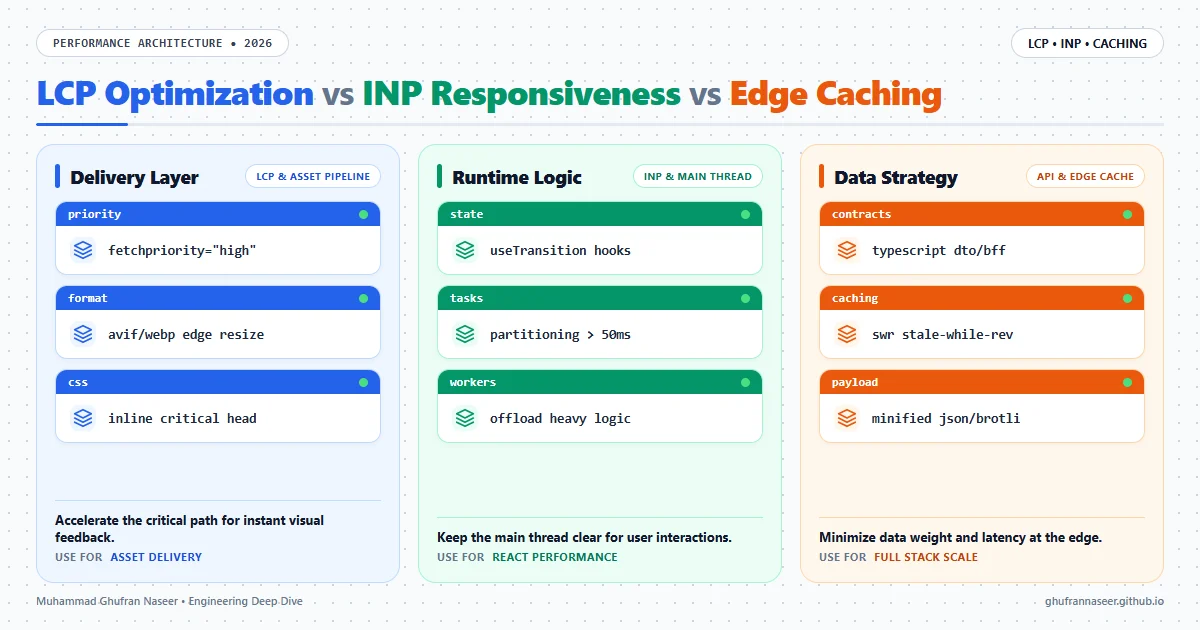
In the engineering landscape of 2026, the definition of a 'fast' website has undergone a fundamental shift. We have moved past the era where a simple 'DOMContentLoaded' event was the gold standard. Today, user retention and search engine visibility are dictated by Core Web Vitals, specifically Largest Contentful Paint (LCP) and the recently promoted Interaction to Next Paint (INP). For senior engineers, optimizing these metrics is no longer about just minifying JavaScript; it is about sophisticated resource orchestration, main-thread management, and intelligent edge delivery.
The challenge in modern full-stack development lies in the 'Hydration Gap'—the period where a page looks ready but remains unresponsive because the main thread is locked by heavy JavaScript execution. As we build increasingly complex React and Next.js applications, the trade-off between rich interactivity and performance becomes more acute. This article explores the architectural patterns required to achieve sub-second LCP and ultra-low INP in production environments, moving beyond basic tutorials into industrial-grade optimization strategies.
1. The LCP Priority Loop: Optimizing the Critical Path
Largest Contentful Paint (LCP) is often misunderstood as a purely frontend concern. In reality, it is a full-stack metric that begins at the DNS lookup and ends when the largest visible element—usually a hero image or a block of text—is fully rendered. To optimize this, we must implement a 'Priority Loop' that ensures the browser discovers and fetches critical assets before it even parses the bulk of the application logic.
Resource Hints and Fetch Priority
Modern browsers now support the fetchpriority attribute, which is a game-changer for LCP. By marking hero images with fetchpriority="high", we signal to the browser's preload scanner that these assets should jump to the front of the network queue, even before some render-blocking scripts. This is particularly effective when combined with link rel="preconnect" for third-party image CDNs.
<!-- Optimized LCP Image Implementation -->
<link rel="preconnect" href="https://images.example.com">
<img
  src="/hero-2026.avif"
  fetchpriority="high"
  loading="eager"
  alt="Main Product Visual"
/>
Eliminating Render-Blocking Requests
Every millisecond spent waiting for a CSS file or a synchronous script is a millisecond added to your LCP. In 2026, the standard is to inline 'Critical CSS'—the styles required for the above-the-fold content—directly into the HTML <head>. This allows the browser to begin painting the UI immediately upon receiving the first chunk of the HTML response, rather than waiting for external stylesheet round-trips.
2. Solving Interaction to Next Paint (INP) in React
While LCP measures loading, INP measures responsiveness. It tracks the latency of all interactions (clicks, taps, and keyboard inputs) throughout the lifespan of a page. A high INP usually indicates a 'janky' UI where the main thread is overwhelmed by long-running JavaScript tasks. In React applications, this is frequently caused by massive component re-renders or inefficient state management.
Leveraging Concurrent Rendering
React's useTransition and useDeferredValue hooks are essential tools for maintaining a low INP. By wrapping non-urgent state updates (like filtering a long list) in a transition, we allow React to interrupt the rendering process if a user interaction occurs. This ensures that a button click or text input remains responsive, even while the background UI is being updated.
Task Partitioning and yielding
Long tasks—any script execution exceeding 50ms—are the primary enemies of INP. Senior engineers must practice 'Task Partitioning,' breaking down large computations into smaller chunks that yield back to the main thread. This can be achieved using scheduler.yield() (in supported browsers) or setTimeout(..., 0), allowing the browser to process pending user inputs between chunks of work.
| Metric | Primary Driver | Optimization Target |
|---|---|---|
| LCP | Network/Assets | Critical Path Delivery < 1.2s |
| INP | CPU/Main Thread | Script Execution Time < 200ms |
| CLS | Layout Stability | Visual Stability < 0.1 score |
3. TypeScript API Contracts and Payload Optimization
Performance isn't just about how you render; it's about what you fetch. Large, unoptimized JSON payloads from the backend can bloat the main thread during parsing and increase memory pressure. Using TypeScript to define strict API contracts (DTOs - Data Transfer Objects) ensures that the frontend only receives the data it needs for the current view.
BFF (Backend-for-Frontend) Pattern
In complex architectures, the BFF pattern allows us to aggregate data from multiple microservices and prune unnecessary fields before the data reaches the client. This reduces the 'Total Byte Weight' of the application, which directly correlates to faster LCP and lower INP. When using tools like tRPC or GraphQL, we can enforce these contracts at compile-time, ensuring that a change in the database schema doesn't accidentally send an extra 500KB of unused metadata to the user's browser.
4. Advanced Caching and Edge Strategies
Static Site Generation (SSG) is no longer sufficient for dynamic 2026 applications. We now rely on Incremental Static Regeneration (ISR) and Edge Middleware to deliver personalized content at static speeds. The goal is to move the 'Decision Engine' as close to the user as possible.
Stale-While-Revalidate (SWR) at the Edge
By utilizing Cache-Control: s-maxage=1, stale-while-revalidate=59, we can serve users a cached version of a page instantly (optimizing LCP) while the CDN revalidates the content in the background. This pattern is particularly effective for product listings or dashboard summaries where absolute real-time data is less critical than immediate visual feedback.
- Regional Edge Functions: Use middleware to handle geo-location and A/B testing logic at the edge, preventing layout shifts and reducing Time to First Byte (TTFB).
- Image Transformation CDNs: Automate AVIF conversion and resizing based on the User-Agent to ensure the smallest possible payload for LCP elements.
- Brotli Compression: Ensure all text-based assets (HTML, JS, CSS) are compressed using Brotli at the highest level permitted by your build pipeline.
Common Engineering Mistakes to Avoid
In production environments, several 'anti-patterns' frequently degrade performance despite good intentions:
- Over-Hydration: Hydrating static components (like footers or sidebars) that never change. Use 'Island Architecture' or React Server Components to keep these purely static.
- Client-Side Image Resizing: Relying on CSS to resize a 4MB image. This wastes bandwidth and increases LCP. Always serve appropriately scaled assets.
- Synchronous Third-Party Scripts: Loading analytics or tracking pixels synchronously in the
<head>. These should always beasyncordefer, and ideally moved to a Web Worker via Partytown. - Ignoring Cumulative Layout Shift (CLS): Failing to reserve space for ads or dynamic images, causing the page to 'jump' and frustrating the user.
Conclusion
Optimizing for Core Web Vitals in 2026 requires a holistic understanding of the browser's rendering pipeline, the limitations of the JavaScript event loop, and the power of edge computing. By prioritizing the critical path for LCP and ensuring the main thread remains available for INP, we build applications that are not just functional, but delightful to use.
Remember: Performance is a feature, not an afterthought. A 100ms delay in interaction is the difference between a tool that feels like an extension of the user and a tool that feels like a burden.