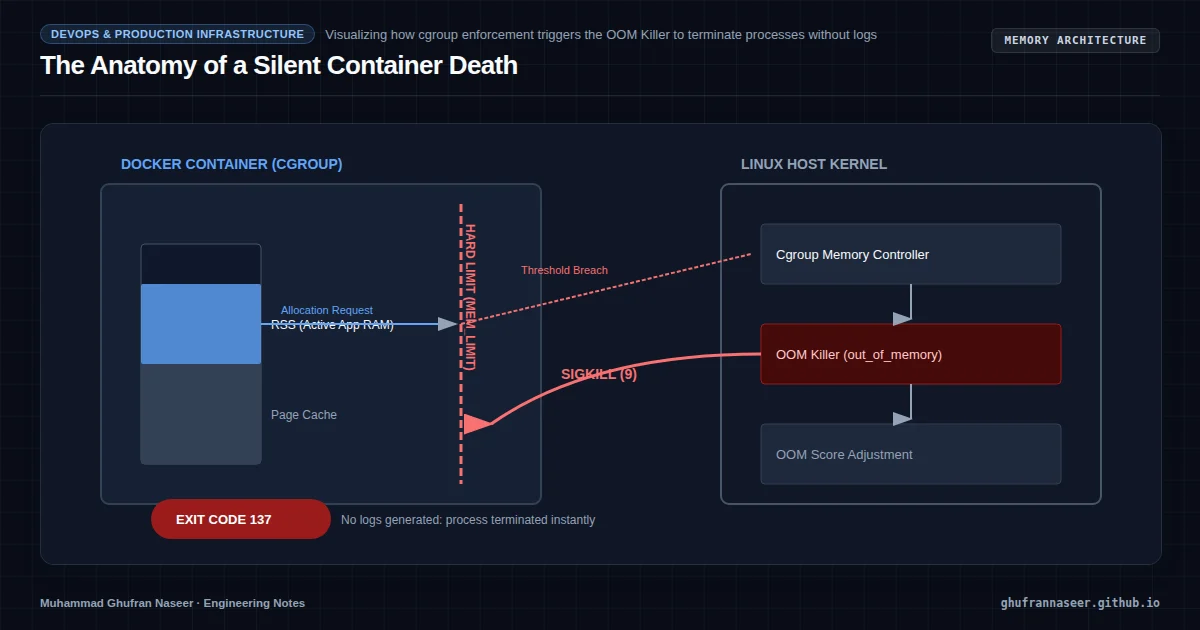
It is a scenario every systems engineer has faced: a containerized application that performs flawlessly in a local development environment with 32GB of RAM suddenly begins to vanish in production. There are no application-level stack traces, no 500 errors in the logs, and no 'Out of Memory' exceptions in the runtime. The process simply ceases to exist, leaving behind only a cryptic Exit Code 137 in the Docker daemon logs.
This is the work of the Linux Kernel’s Out-Of-Memory (OOM) Killer. In constrained VPS environments—where 2GB or 4GB of RAM is the norm—the interaction between Docker’s resource isolation and the host kernel’s memory management becomes a critical architectural frontier. To build resilient systems, we must move beyond simply 'adding more RAM' and instead architect for the constraints of the infrastructure.
The Anatomy of a Silent Death
When the Linux kernel detects that the system is critically low on memory, it must make a choice: crash the entire OS or terminate a specific process to free up pages. This decision is governed by the oom_killer. In a Dockerized environment, this becomes more complex because the kernel is managing memory through Control Groups (cgroups).
When a container hits its hard memory limit, the kernel doesn't necessarily kill the whole system; it kills the process inside that specific cgroup. Because the process is terminated abruptly by a SIGKILL (Signal 9), the application never gets a chance to run a shutdown hook or log the error. This is why your application logs look perfectly healthy right up until the moment of total silence.
The 'Resident Set' Illusion
A common mistake in managing VPS environments is misinterpreting memory metrics. Engineers often look at docker stats and see a container using 500MB of a 1GB limit and assume they have safety headroom. However, memory is not a monolithic block. It is divided into:
- RSS (Resident Set Size): The actual physical memory the process is using.
- Cache/Buffer: Memory used by the kernel to speed up disk I/O.
- Virtual Memory: The total address space mapped by the process.
Docker's default reporting often includes cache in the usage statistics. If your application performs heavy disk I/O (like a database or a log processor), the cache can grow until it hits the container limit. While the kernel can reclaim cache, it often triggers the OOM killer if the reclamation process isn't fast enough to satisfy a new allocation request from the application.
Architecting the Resource Boundary
To prevent unpredictable crashes, we must define explicit resource boundaries in our docker-compose.yml or orchestration manifests. There are two primary levers: limits and reservations.
services:
  api-gateway:
    image: custom-api:latest
    deploy:
      resources:
        reservations:
          memory: 256M
        limits:
          memory: 512M
    oom_score_adj: -500
The reservation (Soft Limit) tells the Docker engine how much memory the container is guaranteed to have. The limit (Hard Limit) is the absolute ceiling. If the container attempts to exceed the limit, it becomes a candidate for the OOM Killer. By setting the reservation lower than the limit, you allow the container to burst during high-load periods while maintaining a predictable baseline for the rest of the VPS.
The Swap Accounting Trap
On many cloud-provider VPS images (especially Ubuntu or Debian), Docker's ability to limit memory+swap is disabled by default. If you set a 512MB limit but the host has a 2GB swap file, the container might continue to consume memory by spilling into the swap. This prevents the crash but destroys performance, as the application enters a 'thrashing' state where it spends more time swapping memory to disk than executing code.
To fix this, you must enable cgroup swap accounting at the kernel level by modifying the GRUB configuration:
# Edit /etc/default/grub
GRUB_CMDLINE_LINUX_DEFAULT="quiet splash cgroup_enable=memory swapaccount=1"

# Update and reboot
sudo update-grub && sudo reboot
Once enabled, you can strictly limit total memory usage (RAM + Swap) to ensure one 'leaky' container doesn't degrade the disk I/O of the entire VPS.
Adjusting the OOM Score
Not all processes are created equal. In a production VPS, you might have a reverse proxy (Nginx), a database (PostgreSQL), and a background worker. If memory runs out, you would likely prefer the background worker to die rather than the database or the proxy.
The kernel uses an oom_score to determine which process to kill. The higher the score, the more likely the process is to be terminated. You can influence this using oom_score_adj (ranging from -1000 to 1000). By setting a negative value for critical infrastructure like Nginx, you effectively tell the kernel: 'Kill this last.'
Observability: Catching the Killer
Since the application cannot log its own OOM death, you must monitor at the system level. The most reliable way to diagnose an OOM event is by inspecting the kernel ring buffer. On your VPS, run:
dmesg -T | grep -i 'killed process'This will show you exactly which process was killed, its PID, and the state of the system memory at that moment. For a modern engineering workflow, you should integrate an exporter like node_exporter or cadvisor to track the container_oom_events_total metric in Prometheus. This allows you to alert on OOM events before they become a pattern of instability.
The Engineering Takeaway
Resilience in constrained environments is not about having the most resources; it is about having the most predictable resources. By configuring hard limits, enabling swap accounting, and prioritizing processes via OOM scores, we transform a VPS from a fragile environment where containers 'disappear' into a robust platform where resource exhaustion is handled gracefully and transparently.