In a development environment, a schema migration is a non-event. You run ALTER TABLE orders ADD COLUMN status_code INT; and it finishes in milliseconds. However, executing that same command on a production table with ten million rows and high transactional throughput is an entirely different beast. It is a common misconception among engineers that the duration of the migration is the primary risk. In reality, the most dangerous aspect of a schema change is not the data rewrite—it is the Access Exclusive Lock.
The Anatomy of a Database Deadlock
To understand why migrations fail, we must look at how engines like PostgreSQL manage concurrent access. When you issue an ALTER TABLE command, the database requires an Access Exclusive Lock. This lock is the highest level of restriction; it prevents all other sessions from accessing the table, including simple SELECT queries.
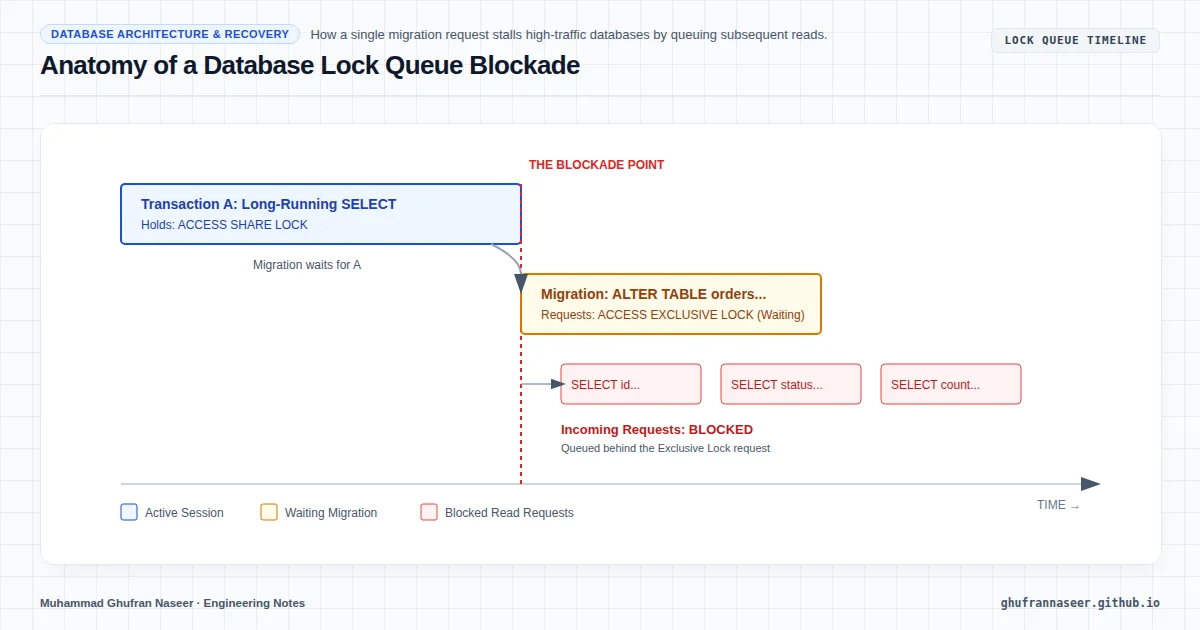
The catastrophe usually unfolds in three stages:
- The Long-Running Transaction: A background reporting job or a slow API request is currently reading from the
orderstable. It holds anAccess Share Lock. - The Migration Request: You trigger your migration. The
ALTER TABLErequest enters the lock queue. It cannot proceed until the long-running transaction finishes. - The Queue Blockade: While the migration is waiting in the queue, it blocks every subsequent request. Even a simple, fast
SELECTthat arrives after the migration request will be queued behind theALTER TABLE.
Within seconds, your application’s connection pool is exhausted as every worker thread sits idle, waiting for a table that is technically "up" but effectively unreachable. This is the "Lock Queue" failure mode, and it is the silent killer of high-availability systems.
Strategy 1: Implementing Defensive Lock Timeouts
The first line of defense is ensuring that a migration fails fast rather than taking down the entire application. By default, most databases will wait indefinitely for a lock. We must override this behavior at the session level before running the migration.
-- Set a short lock timeout (e.g., 2 seconds)
SET lock_timeout = '2s';

-- Attempt the migration
ALTER TABLE users ADD COLUMN last_login_at TIMESTAMPTZ;

-- If it fails, the script exits without clogging the queue.
By setting a lock_timeout, we instruct the database to abort the migration if it cannot acquire the necessary lock within the specified window. This allows the engineer (or the automation pipeline) to retry during a lower-traffic period without impacting live users.
Strategy 2: The Concurrent Indexing Pattern
Creating an index is one of the most common schema operations. On large tables, a standard CREATE INDEX will lock the table for writes for the duration of the build. In PostgreSQL, we solve this with the CONCURRENTLY keyword.
-- This does NOT block writes, but takes longer to complete
CREATE INDEX CONCURRENTLY idx_orders_customer_id ON orders(customer_id);
However, there is a trade-off: concurrent index builds cannot run inside a transaction block. If the build fails (e.g., due to a constraint violation), it leaves behind an "invalid" index that must be dropped and recreated. Monitoring pg_stat_all_indexes is essential to ensure your production environment isn't littered with dead index metadata.
Strategy 3: Safe Column Addition and Defaults
Historically, adding a column with a DEFAULT value was a dangerous operation because the database had to rewrite every row on disk to include the new value. Since PostgreSQL 11, adding a column with a constant default is a metadata-only change, making it nearly instantaneous.
However, if you are working with older versions or complex expressions, the safe pattern involves three distinct steps:
- Step 1: Add the column without the default or constraints (Null allowed).
- Step 2: Update the data in small batches to avoid long-lived locks and transaction log (WAL) bloat.
- Step 3: Apply the
NOT NULLconstraint and theDEFAULTvalue separately.
When applying a NOT NULL constraint to a large table, use a CHECK constraint with NOT VALID first, then VALIDATE it later. This prevents a full table scan while holding an exclusive lock.
-- Step A: Add the constraint but don't validate yet
ALTER TABLE transactions
ADD CONSTRAINT check_amount_positive
CHECK (amount > 0) NOT VALID;

-- Step B: Validate (Scan happens without Access Exclusive Lock)
ALTER TABLE transactions
VALIDATE CONSTRAINT check_amount_positive;
The Operational Checklist for Zero-Downtime Migrations
Before any production schema change, the engineering team should verify the following:
| Checklist Item | Technical Reason |
|---|---|
| Check for long-running transactions | Prevents the migration from getting stuck in the lock queue. |
| Disable statement timeouts for the session | Allows data-heavy migrations to finish if the lock is acquired. |
Monitor pg_stat_activity | Identifies which PID is holding the lock blocking your migration. |
| Verify replication lag | Heavy DDL can stall replicas and cause stale reads. |
Conclusion: Engineering for the "Worst Case"
Reliable database architecture is not just about normalization or query optimization; it is about managing the transition of state. A Senior Engineer recognizes that code is transient, but data is permanent. By treating migrations as high-risk operations that require explicit lock management and staged execution, we move away from "hope-based deployments" toward deterministic system reliability.
The goal is simple: the user should never know the schema changed. Whether you are adding a column to a table of 100 rows or 100 million, the discipline of using lock timeouts and non-blocking operations remains the same. This is the hallmark of production-grade systems engineering.