In the world of enterprise systems, a WordPress migration is often perceived as a trivial task: move the files, dump the SQL, and update the URLs. However, for high-traffic sites or complex builds utilizing page builders like Elementor or heavy WooCommerce configurations, this process frequently leads to a catastrophic "silent failure." The site loads, but the layout is shattered, widgets have vanished, and plugin settings have reverted to defaults.
As a systems engineer, diagnosing this requires moving beyond the application layer and into the mechanics of how PHP handles data persistence. The culprit is almost always serialized data corruption. Unlike modern applications that favor JSON, WordPress and its ecosystem rely heavily on PHP’s serialize() and unserialize() functions. When you attempt to migrate a site using a simple SQL REPLACE or a sed command, you aren't just changing a string; you are breaking a precise data contract.
The Anatomy of the Failure
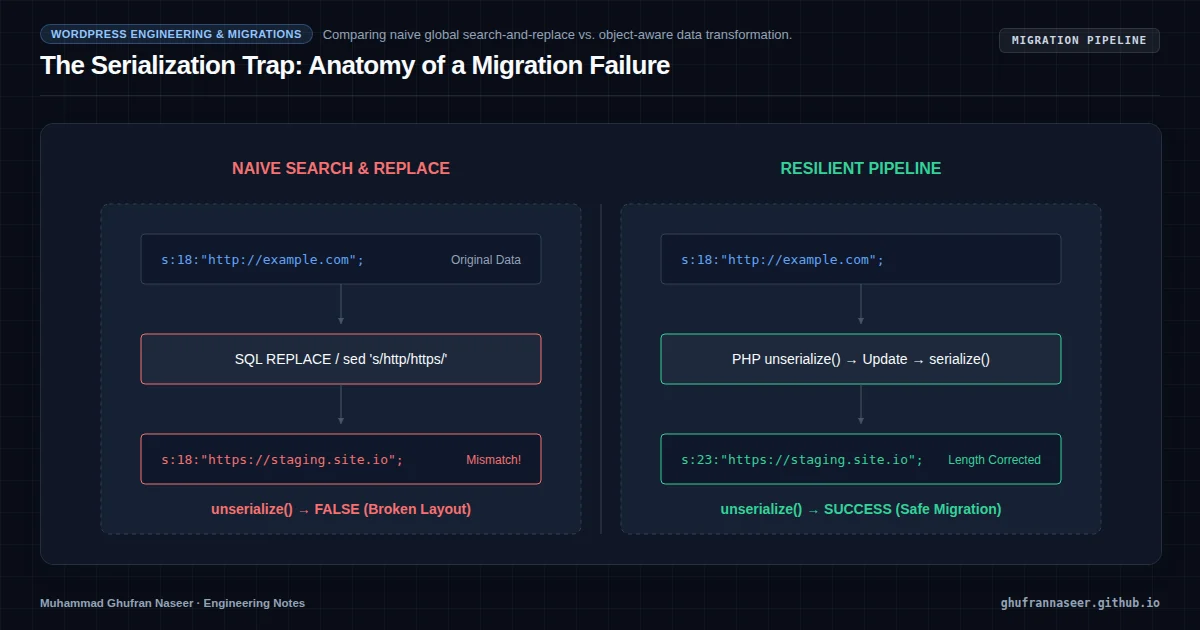
To understand why migrations fail, we must look at the structure of a serialized string. Consider a simple option stored in the wp_options table:
a:1:{s:4:"site";s:18:"http://example.com";}In this format, s:18 explicitly declares that the following string is exactly 18 characters long. If an engineer performs a global search-and-replace to update the domain to https://staging.newdomain.io, the string becomes 28 characters long. However, the metadata still says s:18.
When the WordPress core or a plugin calls unserialize() on this value, the PHP parser encounters a mismatch. It expects the string to end after 18 characters, finds more data instead, and fails. The function returns false, the application receives a null value where it expected an array or object, and the site breaks. This is why "Search and Replace" plugins or raw SQL queries are dangerous for production migrations.
The Multi-Layered Complexity of Page Builders
Modern WordPress engineering involves tools like Elementor or Divi, which introduce nested serialization. They often store CSS rules, layout configurations, and widget data as serialized arrays, which are sometimes further encoded as JSON strings or even Base64. A single global search-and-replace can trigger a domino effect of corruption across thousands of rows in the wp_postmeta table.
| Migration Method | Serialization Awareness | Risk Level | Scalability |
|---|---|---|---|
| SQL REPLACE | None | Critical | High |
| Search/Replace Plugins | Partial | Medium | Low (Timeouts) |
| WP-CLI search-replace | Full | Low | High |
Architecting a Resilient Migration Pipeline
For a Senior Engineer, the goal isn't just to move the data, but to ensure referential and structural integrity. The following workflow represents a production-grade approach to migrating large-scale WordPress databases.
1. Decoupling the Database from the Environment
Never perform a search-and-replace on a live production database. The process is resource-intensive and can lock the wp_options or wp_postmeta tables, causing site-wide latency. Instead, export the database to a dedicated migration environment.
# Export without locking tables to maintain uptime
mysqldump --single-transaction --quick -u [user] -p [db_name] > migration_dump.sql
2. Leveraging WP-CLI for Atomic Replacements
WP-CLI is the industry standard because it handles serialization natively. It pulls the data into PHP, unserializes it into an object, performs the replacement, and re-serializes it before writing back to the database. This ensures the s:[length] attribute is always recalculated correctly.
# Perform a dry run first to quantify the impact
wp search-replace "https://old-domain.com" "https://new-domain.com" --dry-run --all-tables

# Execute the replacement on all tables including custom ones
wp search-replace "https://old-domain.com" "https://new-domain.com" --all-tables --precise --report-changed-only
3. Handling Large-Scale Data (The 10GB+ Problem)
When dealing with databases containing millions of rows in wp_postmeta, WP-CLI can hit PHP memory limits or execution timeouts. To mitigate this, we use the --skip-columns flag for columns that we know do not contain URLs (like IDs or timestamps) and process the migration in chunks.
Furthermore, avoid updating the guid column in the wp_posts table. In WordPress, the GUID is a unique identifier for RSS feeds; changing it can cause feed readers to treat every old post as a new entry, spamming subscribers.
The Verification Phase: Post-Migration Diagnostics
Engineering doesn't end with a successful command execution. We must verify the integrity of the data. A common anti-pattern is manually checking the homepage and calling it a success. Instead, use automated checks:
- Checksum Validation: Compare row counts between source and destination.
- Broken Link Scanning: Use a headless crawler (like Screaming Frog or a custom Guzzle script) to identify 404s caused by partial replacements.
- Log Analysis: Monitor PHP error logs for
unserialize(): Error at offset...warnings, which are the smoking gun of serialization corruption.
Operational Considerations: Security and Cache
Once the database is migrated, two critical steps remain. First, flush the object cache (Redis or Memcached). If the application serves stale serialized data from the cache, the site will appear broken even if the database is perfect. Second, regenerate any CSS files generated by page builders, as these often hardcode the old domain in their cached files.
"In systems engineering, the most dangerous failures are the ones that don't throw an error. Serialized data corruption is a silent killer of WordPress availability."
By treating WordPress migrations as a data integrity challenge rather than a file transfer task, we can achieve zero-downtime transitions for even the most complex enterprise environments. The key is respecting the underlying PHP data structures and utilizing tools designed for atomic, serialization-aware operations.